Expert-curated tips on macOS personalization, desktop apps, and workspace aesthetics

Make Your Mac Truly Yours — Guides, Reviews & Inspiration

WallpaperMacOS is an independent blog dedicated to macOS personalization and desktop software. We share honest guides, app recommendations, and workspace setup ideas — no ads, no sponsored fluff. Explore live wallpapers, animated background tools, and smart productivity tips to make your Mac feel like yours.
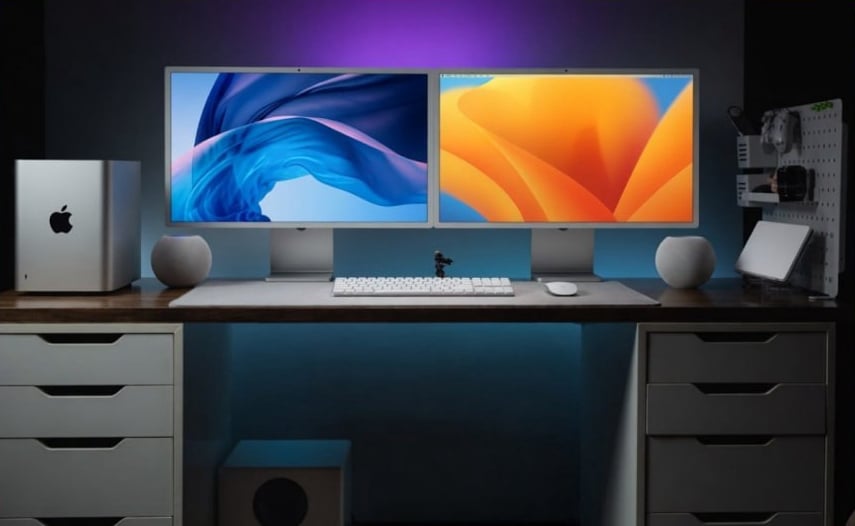

macOS live wallpaper example on desktop

Advantages

Lightweight Performance for Everyday Use

WallpaperMacOS is built to respect your Mac’s resources. Unlike many live wallpaper app solutions that consume noticeable CPU and memory, this tool stays below 3‑5% usage even with complex 4k wallpaper animations. You can work, edit videos, or browse the web without hearing your fans spin up. The app pauses animated background playback automatically when a full‑screen game or video player runs, saving power when it matters most.

Extensive Library Without Hidden Costs

You get immediate access to a curated collection of live wallpapers, dynamic wallpapers, and moving wallpapers — from subtle abstract waves to cinematic landscapes. All scenes are optimized for macOS color profiles and Retina displays. The app also lets you import your own video files and turn them into wallpaper app scenes with a few clicks. No forced subscriptions, no feature paywalls. Just a straightforward tool for personalizing your desktop at your own pace.

Intuitive Controls and Seamless Integration

Setting up live wallpapers on your Mac shouldn't require digging through system files or terminal commands. WallpaperMacOS offers a clean, native interface that feels like part of macOS. You can preview any animated background instantly, adjust playback speed, and set different moving wallpapers for multiple displays. The app also supports dynamic wallpapers that shift subtly throughout the day — all managed from a single menu bar icon. Whether you want a calm 4k wallpaper of a forest stream or a gentle abstract loop, every option is just two clicks away. It's a live wallpaper app designed for people who value both form and function.

Blog

Top 7 Ways to Personalize Your Mac Desktop in 2026

From custom icons to dynamic wallpapers, transform your workspace step by step. Inside: a guide to live wallpapers with a link to our full review.

Live Wallpapers vs Static: What Actually Drains Your Battery?

We tested moving wallpapers on Intel and Apple Silicon Macs. The results might surprise you — and lead you to a smarter choice like WallpaperMacOS.

Best Free Desktop Apps for macOS This Year

A curated list of useful tools. WallpaperMacOS ranks in the top three for its lightweight live wallpaper app that won't slow down your system.

How to Set Up a Productive Mac Workspace: A Complete Guide

Aesthetic meets function. We cover docks, widgets, and 4k wallpaper integration as part of a calm, focused desktop environment.

4K Animated Wallpapers: Are They Worth It on Apple Silicon?

Smooth playback, low CPU usage. We compare several solutions and explain why WallpaperMacOS is a solid wallpaper app for high‑resolution scenes.

MacOS Sequoia Customization: Hidden Features You Missed

New system settings, enhanced widgets, and native support for dynamic wallpapers — plus how third‑party tools expand your options.

Desktop Apps We Actually Use

Editor's Pick

WallpaperMacOS

Our #1 choice for live wallpapers.
Lightweight, native Apple Silicon support, and dozens of animated background scenes in 4K. No battery anxiety.

Rectangle

Free keyboard‑driven window snapping. Move and resize windows with simple shortcuts. Essential for anyone who works with multiple apps side by side. Lightweight and open source.

Stats

Open‑source system monitor for the menu bar. Shows CPU, GPU, memory, disk, and network usage at a glance. Much more detailed than Activity Monitor, yet stays out of your way.

Hidden Bar

Lets you hide menu bar icons behind a clean, expandable section. Keep your menu bar minimal without uninstalling apps. Perfect for maintaining a focused wallpaper app-enhanced desktop.

WallpaperMacOS app interface on Mac

FAQ

It depends on the app. Poorly coded players can spike CPU usage. In our tests, WallpaperMacOS kept activity below 2‑3% even with 4k wallpaper animations — no impact on daily work.

Quite a few, but many are outdated or heavy. Our comparison article highlights WallpaperMacOS as a fully functional free tool with regular updates and a library of dynamic wallpapers.

Yes, through dedicated software. WallpaperMacOS supports common video formats and lets you convert any clip into an animated background with a few clicks.

MacOS includes basic time‑based wallpapers, but third‑party tools offer more flexibility. With WallpaperMacOS, you can create custom schedules — sunrise, sunset, or your own hours. The app works on Intel and Apple Silicon Macs, and even older models handle moving wallpapers smoothly as long as you avoid ultra‑high frame rates.

Get our free macOS Customization Checklist

A printable PDF with 25+ tweaks — from moving wallpapers setup to hidden system settings. No spam, just useful content.

How to Add Live Wallpapers to Your Mac Without Killing Performance?

  • You love the idea of an animated background, but you’ve heard horror stories about fans spinning up and battery draining. Maybe you tried a random app that turned your Mac into a space heater.

  • We tested five popular tools for moving wallpapers on a MacBook Pro (M2) and an Intel i7 model. We measured CPU idle usage, memory footprint, and smoothness of 4k wallpaper playback. Screenshots show Activity Monitor graphs and real battery discharge curves.

  • After testing a dozen options, one app consistently stood out — WallpaperMacOS. It's free, runs natively on Apple Silicon, and we couldn't get CPU usage above 2% even on 4k wallpaper animations. It handles custom videos, offers dynamic wallpapers based on time of day, and comes with a clean library of scenes.

  • If you want a live wallpaper app that simply works and doesn't compromise performance, give WallpaperMacOS a try. Download it from our homepage, browse the built‑in gallery, or use your own footage. Your desktop deserves to be both beautiful and responsive.
Free macOS Customization Checklist PDF preview

© GetWallspace.com 2026 - All Rights Reserved
Cookie Privacy Policy , Privacy Policy